Testing 3DCoat

Recently, I’ve been playing with the trial version of 3DCoat. A problem I’ve been having with Blender that’s been frustrating me is the sculpting performance. When watching timelapses of other people sculpting, I noticed that often, even with single bits like an arm or a leg, they could easily go into hundreds of thousands of faces and above, especially when smoothing, adding creases, etc. In Blender, I can only get to about 100,000 triangles before it starts to slow down slightly, particularly when trying to undo. At a minimum, with the detail level I use, I need around 200,000 – 300,000 for a full body, but the performance really starts to become slow and problematic. It’s just totally insufficient for me. I don’t tend to make extremely high detail meshes, but I’d like the option, and better performance in general, so I started looking at other digital sculpting programs. I’m ignoring ZBrush; though it’s considered the industry standard as I understand it when it comes to digital sculpting, I’m a hobbyist, and don’t need industry standard….And I certainly don’t need industry standard price. There’s no way I can afford it.

I looked at Mudbox first, as it’s immediately the cheapest one that I know of. It’s about £12 a month, last time I checked, which seems to be the most affordable, at least per payment. But, when I tried out its recently added dynamic tesselation, it wasn’t very covnenient or intuitive, and didn’t give me all the options I’d like, and the options it did have weren’t very well explained, though the performance seemed to be alright. But it also didn’t give me as many hotkeys to change as I wanted, which I hate, as I’m really used to using hotkeys for almost everything in Blender. I also had to pay for one month’s subscription to get full access; the demo version didn’t include the dynamic tesselation, which was the thing I was really interested in as I hate to have to make a base mesh first. I suspect it was deliberate, to extract more money from people.

What I’ve been trying now is 3DCoat, which I’m liking. The workflow is different than I’m used to, but I can see the logic in it, and it gives me many more hotkeys to setup. I was easily able to replace most of the default ones with what I’m used to, and, with a bit of practice, familiarise myself with the different ways some of the brushes, such as the Snake Hook work than what I’m used to, and which ones may be the best options to replace the brushes and settings I’m used to using. I’m enjoying it so far, and the performance, as expected, blows Blender out of the water. I’ve found it fairly easy to get used to, though some things don’t work as I’d expect them to.

So, I did a few test head sculpts to practice and familiarise myself with it and work out how I should work in it. I didn’t reference with these; it was more like doodling than any serious attempt to make something. I need to study more faces and gain variety, though. Especially people from various ethnic origins and ages.

I’m going to spend more time practicing with 3DCoat and see what else I can do with it. But I have a good feeling about it. And I definitely can’t go back to Blender’s sculpting the same way after this. I may well end up buying it.

NPR Shader Experiments 01

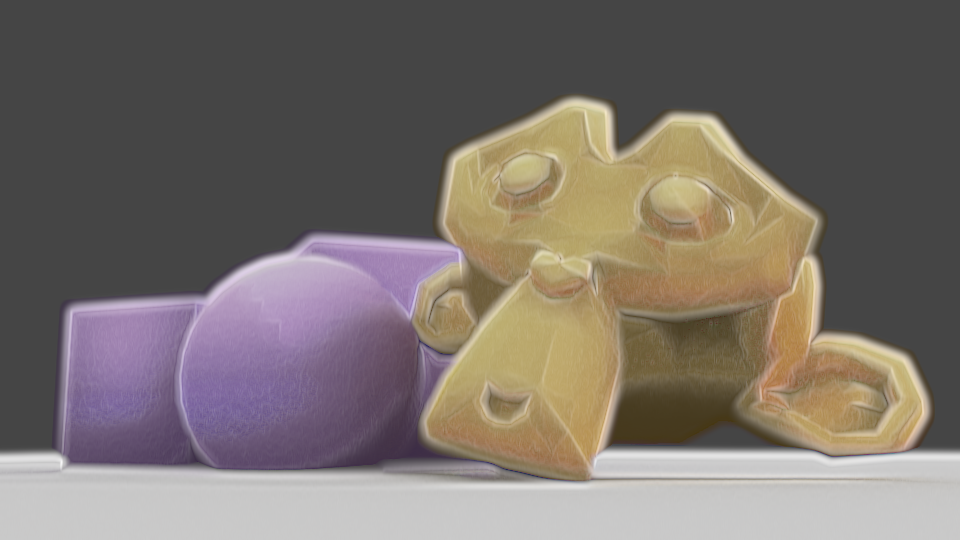
I’ve been experimenting for the last few days with more shaders, using Eevee in Blender 2.8. I started trying to replicate my previous compositing effect, then ended up doing something a bit different.

As I can’t use Dilate/Erode with shaders to get a soft edge, I used a Layer Weight node. I wanted to use the Bump node to modify the normals to gain control over how that turned out, using vertex paint to define which normals are bumped, but it ended up displaying incorrectly, so my current solution is to use vertex paint to add or remove colour from the initial appearance, with a second set of vertex paint to modify the shading. I like this method better than using modified normals; I can directly control it, rather than just having to change normals and hope the outcome is correct, or having to change them frequently depending on the lighting or model angle. However, unlike Blender Internal, I can’t currently get a difference in the shader between its own shadows and shadows cast on it by other things, so if I modified the shading for being ugly in an area shadowed by a second object and itself, it would erase the other’s shadow, looking incorrect.

But, if the AnimAll addon is upgraded to work with Blender 2.8, the vertex data will make it animatable, meaning I could easily fix shading every frame. Currently, that addon isn’t compatible with Blender 2.8, though.

I also used a small amount of bump mapping to add a little bit of inconsistency and texture to the models; complete perfection in the shading is a big tell of 3D. I also used a noise texture on the edges of the Layer Weight’s result, to make the imperfect.

I have to work more on this; I think it’s better to combine some of the vertex paint effects, for one. If I’m changing the shading, it should also effect the edge. As it stands, shding that’s removed doesn’t overwrite the original Layer Weight result, so it can cause areas to exist that look too dark next to modified shading. Also, I need to see how it works with different colours. Past experiments have shown dark colours, high saturation, low saturation, behave differently, so I may need to modify how strongly they’re visible according to those to make it look good. I’m making progress, though. I’ll also experiment with applying this to proper models instead of test models, since the purpose is to be actually usable.


Mirror Ryou and Painterly Compositing

A few month few months ago, after having used Cycles for a while, I was frustrated by its lack of support for NPR features. Being designed for realistic rendering, it didn’t lend itself well to stylised renders. But I came across this post in a thread on BlenderArtists, which inspired me to consider ways to use the compositor.

A watercolour and pencil render using Blender’s compositor, by System on the BlenderArtists forum.

So I spent a few weeks trying to work out various ways I could use it. My aim was to create a painterly style, or some approximation of it, using the compositor.

My own replication of that technique.

I started by replicating that affect to familiarise myself with it, then doing my own thing from there. After having spent several weeks trying different thing, I came up with my own effect, and became very familiar with the advantages and disadvantages of using the compositor to create NPR renders.

The advantages:

  • Compositor changes are relatively quick, and don’t need you to re-render an entre scene, saving a lot of time.
  • Compositor changes allow you to affect the image as a 2D render, rather than having to work out how to make things work in 3d.
  • Compositor changes allow you to use some functions that aren’t available for shaders, such as Dilate/Erode, Sharpen/Soften, Sobel, etc.
  • Using the Compositor allows you to texture an entire image in one go, rather than having to apply it to everything.
  • Allows access to many render passes, allowing you a lot of flexibility.

The disadvantages:

  • Each change takes several seconds to show, particularly with complex compositing.
  • One size especially doesn’t fit all; different scenes, such as bright, dim, interior, exterior, may require significant changes to the compositing to look good, or even maintain a similar appearance.
  • No convenient way to control the main and shadow colours of individual objects.
  • Any change, such as rotating a light, changing size, character posing, etc, will require being re-rendered before the compositing can be tweaked; an issue with shaders, as well.
  • Inconvenient to pull from one file to another; shaders on a 3d model would just come with it when appended.
  • Entirely after the fact; it’s manipulation of render passes after they’ve been rendered to try and change them into the desired result, rather than a shader-based method which would likely be designed to ensure the renderer gives the correct result each time.

After a lot of experimenting, I was able to come up with this render of a 3d model I made of Mirror! Ryou, an au version of a Yugioh character that my friend Milliekou and I came up with.

Mirror! Ryou, rendered in Cycles, modified in the compositor, using Freestyle for the lines.
A gif showing the key stages in my compositing. This model is old now.
  • My process starts by doing the usual render.
  • Then, I get the shading Value by dividing the Value of the original image by the combined Value of the Diffuse, Glossy, etc, passes, which I can use as a factor later.
  • Using the Ambient Occlusion pass and Dilate/Erode nodes, I make a mask and mix the background colour with the original colour of the mesh to fill the general shape of the character, giving it soft edges.
  • I also got the light colour on the object, multiplying it with the original colours and then using the shading Value through a colour ramp to make the main shading on the model. I also used the Dilate/Erode tool to make it less perfectly accurate, as perfectly accurate shading is a dead giveaway.
  • For some texture – a key element, I’ve found, of making something look imperfect and not like a 3d model – I massively sharpened the original shading Value, dilated it, then used a Sobel filter, giving it many rings, that I then multiplied the image with to create some texture and imperfection.

I made some errors here; his belt, for example, should be glossy, but I didn’t combine the passes correctly. But overall I’m pleased with the effect, and would like to replicate it in the future. I want to make it more reliable to be able to make lots more images with that style and perfect it. Although, I’m currently waiting for Blender 2.8 to come out official and get more render passes; being able to replicate this with Eevee, if possible, would be extremely helpful. In the meantime, I’m experimenting against with NPR shaders using it, as it allows many more options. I’ll have another post later about my results with that, and hopefully some more actual art. Ultimately, I’ve found the compositor warrants more investigation, and can be a powerful tool, as long as you realise you’re working around Cycles, not with it.